
Data Plane on AWS EKS
Deploy the Aurva Data Plane on an existing Amazon EKS cluster.
Overview
The Aurva Data Plane runs inside your environment and is responsible for collecting telemetry — discovery, classification, query activity, and posture data — from your AWS account, then forwarding it to the Aurva Control Plane for analysis and visualization.
This guide covers Data Plane deployment on an existing Amazon EKS cluster, including infrastructure prerequisites, networking requirements, and the high-level deployment workflow.
High Level Architecture
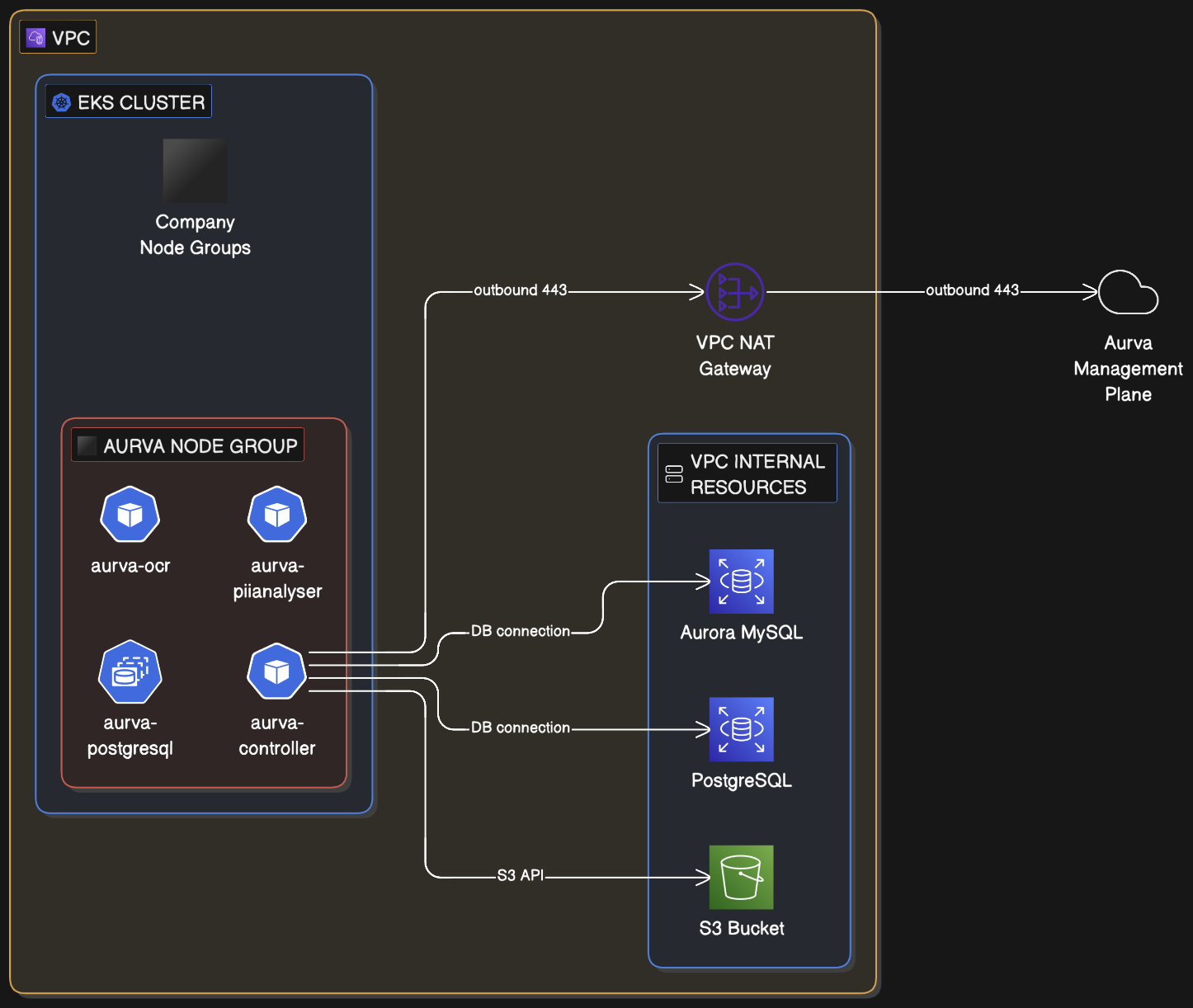
Infrastructure Components
The customer must provision the following infrastructure before installing the Data Plane:
Compute
| Component | Requirement |
|---|---|
| Node group | A dedicated node group is recommended (an existing one can be reused) |
| Architecture | x86_64 |
| Node OS | Amazon EKS-Optimized Linux |
| Instance size | c5a.xlarge (4 vCPU, 8 GB RAM) — minimum |
| Storage | 50 GB minimum |
| Node count | Production: minimum 2; scale out as needed. PoC: 1 is acceptable. |
Storage
| Resource | Configuration |
|---|---|
| S3 bucket | Retention 3 days; SSE-3 server-side encryption; public access blocked; bucket policy restricts access to the Data Plane IAM role |
| Terraform backend | S3 bucket plus DynamoDB lock table for state |
IAM
The Aurva-provided Terraform module provisions the read-only IAM permissions required by the Data Plane. See AWS IAM Permissions for the Data Plane for the full policy document.
Pod Specifications
Aurva deploys the following workloads into the EKS cluster (production sizing):
| Pod | Type | Replicas | Memory | CPU | Product |
|---|---|---|---|---|---|
controller | Deployment | min 1, max 5 | req 500 MiB / lim 1024 MiB | req 500 m / lim 1000 m | All (DAM, Data Flow, DSPM) |
pii-analyser | Deployment | min 1, max 3 | req 2 GiB / lim 4 GiB | req 1000 m / lim 2000 m | All |
ocr | Deployment | min 1, max 1 | req 1 GiB / lim 1 GiB | req 1000 m / lim 1000 m | DSPM |
postgresql | StatefulSet | 1 | req 200 m / lim 500 m | req 500 MiB / lim 500 MiB | All |
ebpf-agent | DaemonSet | One per node | req 300 MiB / lim 600 MiB | req 300 m / lim 600 m | Data Flow |
Networking Prerequisites
The following outbound connectivity must be permitted from the EKS node group:
| Destination | Port | Purpose |
|---|---|---|
Control Plane URL (command.aurva.io for production, command.uat.aurva.io for PoC) | 443 | Data Plane → Control Plane communication |
resources.deployment.aurva.io | 443 | Download deployment scripts and resources |
registry.aurva.io | 443 | Pull Aurva container images |
| Target databases | Native database ports | Required for discovery, classification, and DAM |
Deployment Workflow
The deployment is split into two phases:
- Infrastructure provisioning — provision the IAM role, S3 bucket, DynamoDB table, and any additional networking via the Aurva-provided Terraform module.
- Application installation — install the Aurva workloads into the cluster using the bundled Helm charts.
Detailed step-by-step Terraform and Helm commands for this deployment are provided in the customer-specific runbook delivered by Aurva support during onboarding. Contact Aurva support if you need an updated copy.
Verification
Once installation completes:
-
Confirm the controller pod is
Runningand ready:kubectl -n aurva get pods -
Tail the controller logs to verify the Data Plane has registered with the Control Plane:
kubectl -n aurva logs deployment/controller -f -
In the Aurva console, navigate to Settings → Monitoring Configuration. The new Data Plane should appear and be marked Healthy within a few minutes.
Next Steps
- Onboard your first asset via Onboarding a Data Asset Manually.
- Enable DAM for that asset via Monitoring Configuration.
- Review AWS IAM Permissions for the Data Plane to confirm the IAM role has been provisioned with the required actions.