
Audit Trail
Query-level audit log of all data access activity across your connected data sources.
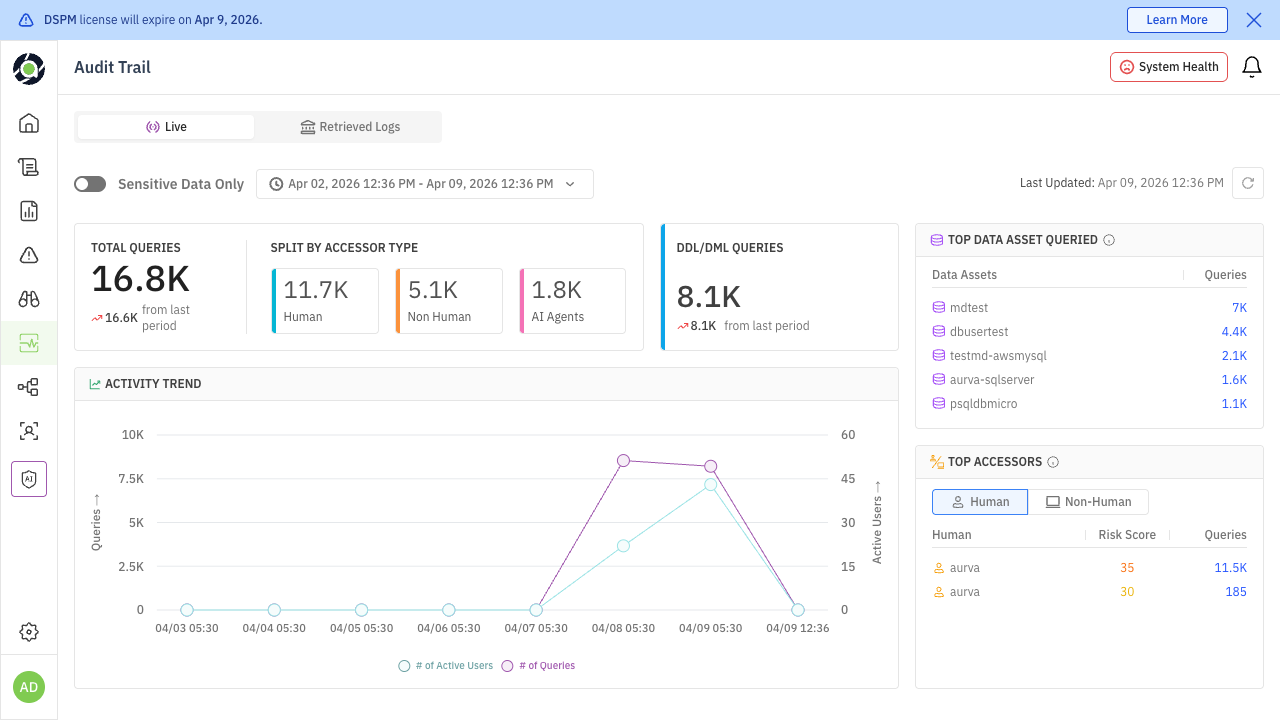
The Audit Trail page provides a searchable, filterable log of every query captured by the Aurva Data Plane across all monitored data sources.
Navigate to DAM → Audit Trail.
Page Components
Header Controls
- Sensitive Data filter — toggle to show only queries involving sensitive data
- Time range picker — select a window from last 1 hour to last 90 days
- System health — connector status for each monitored source
KPI Tiles
| Tile | Description |
|---|---|
| Total Queries | All captured queries in the selected window |
| Human Queries | Queries attributed to human users |
| Non-Human Queries | Queries from service accounts and applications |
| AI Agent Queries | Queries attributed to AI agents |
| DDL Operations | Schema changes (CREATE, ALTER, DROP) |
Activity Charts
- Query volume trend — hourly/daily query count over the selected window
- Top data assets — leaderboard of most-queried assets
- Top accessors — leaderboard of most active identities
Results Table
Each row shows: normalised query text, data asset, tables accessed, database user, source IP, timestamp, and sensitive data labels.
Quick Investigations
Spike Analysis
- 1
Set the time range to the spike window
Use the time picker to isolate the period of interest.
- 2
Toggle the sensitive data filter
Narrow to queries involving sensitive data only.
- 3
Check top assets and accessors
Identify which asset and which accessor drove the spike.
- 4
Drill into the results table
Filter by that accessor and review the specific queries.
After-Hours Access
Filter by access window (time range outside business hours) and accessor type (privileged users). Review the query text for unusual operations.
AI Agent Review
Set accessor type filter to AI Agents and enable the sensitive data toggle. Review which assets and data types are being accessed by autonomous agents.
Save commonly used filter combinations as views. Use Coralogix forwarding to correlate Aurva activity logs with your APM or SIEM data for broader context.