
Control Plane on AWS EKS (Terraform)
Provision the Aurva Control Plane on Amazon EKS using Terraform.
Overview
The Aurva Control Plane stores telemetry from Data Planes, runs analysis pipelines, and serves the Aurva console. This guide covers a self-hosted Control Plane deployment on Amazon EKS using the Aurva-provided Terraform module plus Helm charts.
Infrastructure Components
The Terraform module provisions the following AWS resources:
EKS
| Component | Configuration |
|---|---|
| Architecture | x86_64 |
| Node OS | Amazon EKS-Optimized Linux |
| Instance size | c5a.xlarge (varies with scale) |
| Storage | 100 GB minimum |
RDS (PostgreSQL)
| Component | Configuration |
|---|---|
| Engine version | PostgreSQL 18 |
| Instance class | db.t4g.medium (varies with scale) |
| Storage | 128 GB minimum |
OpenSearch
| Component | Configuration |
|---|---|
| Engine version | OpenSearch 2.19 |
| Instance class | c7g.large.search (varies with scale) |
| Nodes | 3 minimum |
| Volume | Sized based on QPS |
Storage
| Bucket | Configuration |
|---|---|
| Alerts & Reports | Standard, lifetime retention |
| OpenSearch snapshots | Glacier (first 120 days), then Deep Archive |
All buckets use SSE-S3 encryption, block public access, and restrict access to the Control Plane IAM role via bucket policy.
Networking & IAM
| Component | Notes |
|---|---|
| Load balancers | Aurva deploys 1 ALB and 1 NLB |
| IAM | Read/write/delete for S3 and OpenSearch (managed by the Terraform module) |
| Terraform backend | S3 bucket with state versioning |
Deployment Prerequisites
VPC
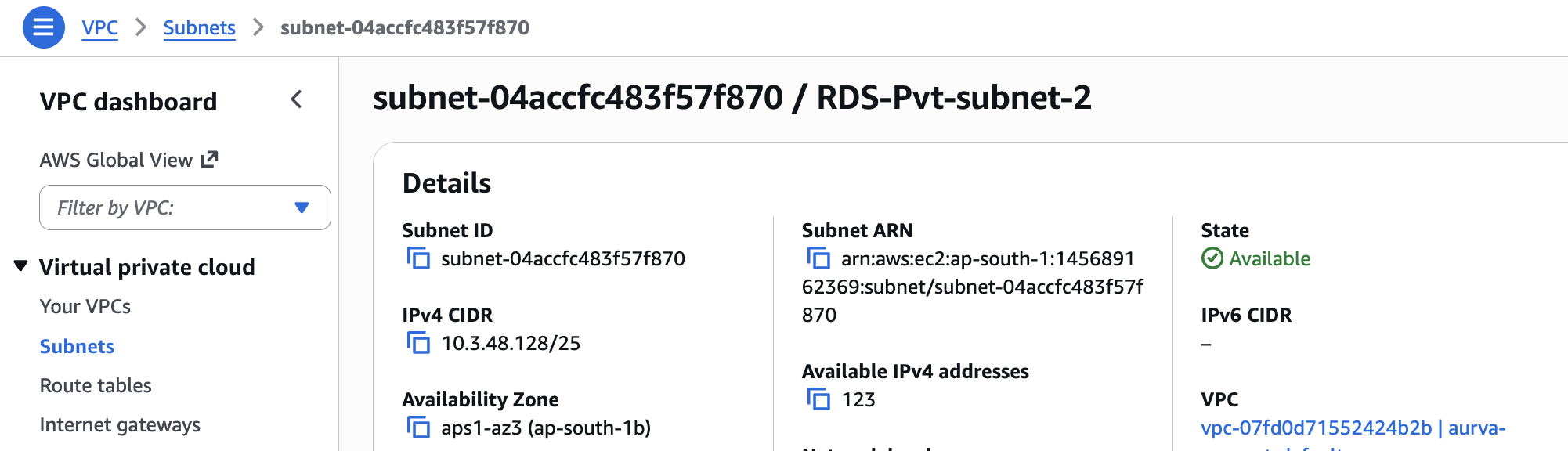
- A VPC with at least 2 private subnets.
- Each subnet must have at least 96 available IPv4 addresses.
VPC Endpoints (air-gapped only)
For air-tight environments without a NAT Gateway, the following VPC endpoints are required (example uses ap-south-1):
com.amazonaws.ap-south-1.acm-pca
com.amazonaws.ap-south-1.ec2
com.amazonaws.ap-south-1.ec2messages
com.amazonaws.ap-south-1.ecr.api
com.amazonaws.ap-south-1.ecr.dkr
com.amazonaws.ap-south-1.eks
com.amazonaws.ap-south-1.eks-auth
com.amazonaws.ap-south-1.elasticloadbalancing
com.amazonaws.ap-south-1.kms
com.amazonaws.ap-south-1.monitoring
com.amazonaws.ap-south-1.s3
com.amazonaws.ap-south-1.sts
com.amazonaws.ap-south-1.wafv2
com.amazonaws.ap-south-1.ssm
com.amazonaws.ap-south-1.ssmmessages
ACM Certificate
An ACM certificate matching your company domain (e.g. *.aurva.com) must already exist in the AWS account. The Terraform module attaches it to the load balancers.
Jump Server
A Linux jump server inside the same VPC, with the following CLIs installed:
| CLI | Verify |
|---|---|
| Helm | helm version |
| kubectl | kubectl version |
| AWS CLI | aws --version |
| curl | curl --version |
| tar | tar --version |
Networking Prerequisites
| Source | Destination | Port | Purpose |
|---|---|---|---|
| VPC | resources.deployment.aurva.io | 443 | Download deployment scripts and resources |
| VPC | bifrost.aurva.io | 443 | License validation |
Deployment Workflow
The deployment is split into two phases: infrastructure (Terraform) and application (Helm).
Infrastructure — Step 0: Configure CLIs and AWS credentials
# AWS credentials (pick one)
aws configure          # static IAM keys
aws sso login          # SSO
Infrastructure — Step 1: Download the bundle
mkdir -p /opt/aurva-controlplane
cd /opt/aurva-controlplane
curl -O https://resources.deployment.aurva.io/manifests/main/install-controlplane-aws-kube.tar.gz
tar -xzvf install-controlplane-aws-kube.tar.gz
After extraction:
install-controlplane-aws-kube/
├── infrastructure/
└── helm/
Infrastructure — Step 2: Configure Terraform variables
cd install-controlplane-aws-kube/infrastructure/terraform
vi terraform.tfvars.tpl
Mandatory variables:
| Variable | Description | Example |
|---|---|---|
aws_region | Target AWS region | ap-south-1 |
create_vpc | Provision a new VPC (true) or use an existing one (false) | false |
air_gapped | Air-gapped deployment with no internet access | false |
create_rds | Provision a new RDS instance | true |
create_opensearch | Provision a new OpenSearch cluster | true |
create_eks | Provision a new EKS cluster (true) or reuse an existing one (false) | true |
Networking (when create_vpc = false):
| Variable | Example |
|---|---|
vpc_id | vpc-0c1e176679c6f5778 |
public_subnet_ids | ["subnet-03c901a039a89e31b", "subnet-0fcdac58aeef4329e"] |
private_subnet_ids | ["subnet-02b70317d0fa1b5d7", "subnet-06aa8777e1dab9cb8"] |
Networking (when create_vpc = true):
| Variable | Example |
|---|---|
vpc_cidr | 10.3.0.0/16 |
public_subnet_cidrs | ["10.3.102.0/24", "10.3.101.0/24"] |
private_subnet_cidrs | ["10.3.3.0/24", "10.3.1.0/24"] |
OpenSearch:
| Variable | Example |
|---|---|
os_instance_type | t3.small.search |
number_of_nodes | 3 (must be ≥ number of private subnets / AZs) |
ebs_volume_size | 100 |
RDS:
| Variable | Example |
|---|---|
rds_instance_class | db.t4g.medium |
rds_storage | 256 |
EKS:
| Variable | Example |
|---|---|
node_group_instance_type | ["t3a.medium"] |
cluster_name | <EKS_CLUSTER_NAME> (only when create_eks = false) |
Infrastructure — Step 3: Run the preflight script
This creates or validates the S3 bucket used as the Terraform backend.
chmod +x preflight.sh
./preflight.sh
Infrastructure — Step 4: Plan and apply
terraform plan  -var-file=tfvars/terraform.tfvars
terraform apply -var-file=tfvars/terraform.tfvars
Pod Specifications
Aurva deploys the following workloads into the EKS cluster:
| Pod | Type | Replicas | Memory | CPU |
|---|---|---|---|---|
aurva-alerts | Deployment | min 1, max 2 | req 500 MiB / lim 1024 MiB | req 500 m / lim 1000 m |
aurva-anomaly-detection | Deployment | min 1, max 2 | req 2 GiB / lim 4 GiB | req 1000 m / lim 2000 m |
aurva-command | Deployment | min 1, max 2 | req 1 GiB / lim 1 GiB | req 1000 m / lim 1000 m |
aurva-gateway | Deployment | min 1, max 2 | req 500 MiB / lim 500 MiB | req 200 m / lim 500 m |
aurva-internal-gateway | Deployment | min 1, max 2 | req 300 MiB / lim 600 MiB | req 300 m / lim 600 m |
aurva-log-ingestion | Deployment | min 1, max 2 | req 300 MiB / lim 600 MiB | req 300 m / lim 600 m |
aurva-queryprocessor | Deployment | min 1, max 2 | req 300 MiB / lim 600 MiB | req 300 m / lim 600 m |
aurva-redis | StatefulSet | 1 | req 300 MiB / lim 600 MiB | req 300 m / lim 600 m |
aurva-riskscore | Deployment | min 1, max 2 | req 300 MiB / lim 600 MiB | req 300 m / lim 600 m |
aurva-system-health | Deployment | min 1, max 2 | req 300 MiB / lim 600 MiB | req 300 m / lim 600 m |
aurva-webapp | Deployment | min 1, max 2 | req 300 MiB / lim 600 MiB | req 300 m / lim 600 m |
Application — Step 1: Export Helm values
terraform output -raw helm_values_snippet > ../helm/env/production.yaml
Application — Step 2: Set the Kubernetes context
aws eks update-kubeconfig \
  --name $(terraform output -raw cluster_name) \
  --region $(terraform output -raw aws_region)
Application — Step 3: Install the Helm chart
cd ../helm
helm upgrade --install aurva-controlplane . \
  -f values.yaml \
  -f env/production.yaml \
  -n aurva-controlplane \
  --create-namespace
Verification
kubectl -n aurva-controlplane get pods
All pods should reach Running. Once the load balancers are healthy, the Aurva console becomes reachable at the configured domain.