
PaaS Architecture On-Premises
Reference architecture for the Aurva PaaS control plane in on-premises environments.
High Level Architecture
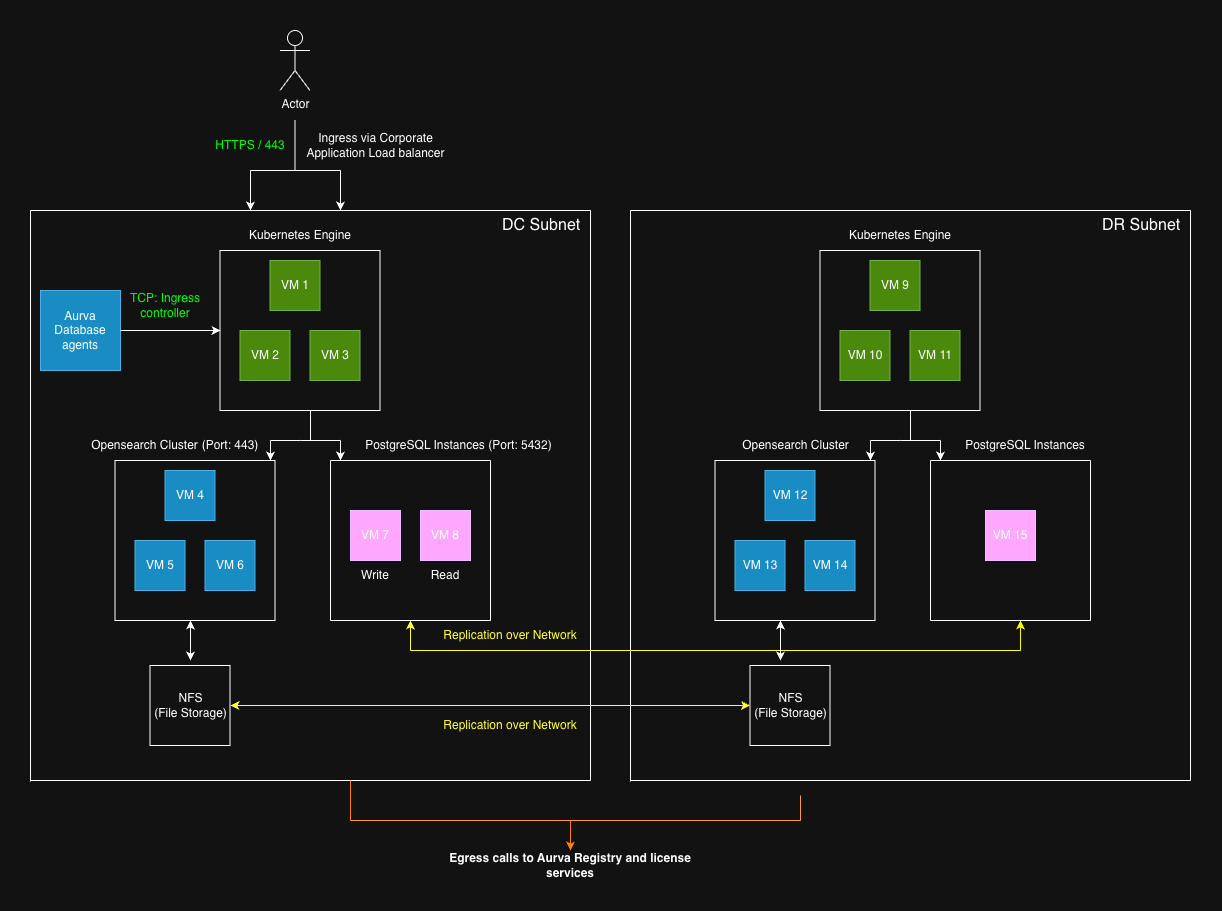
Network Flow diagram
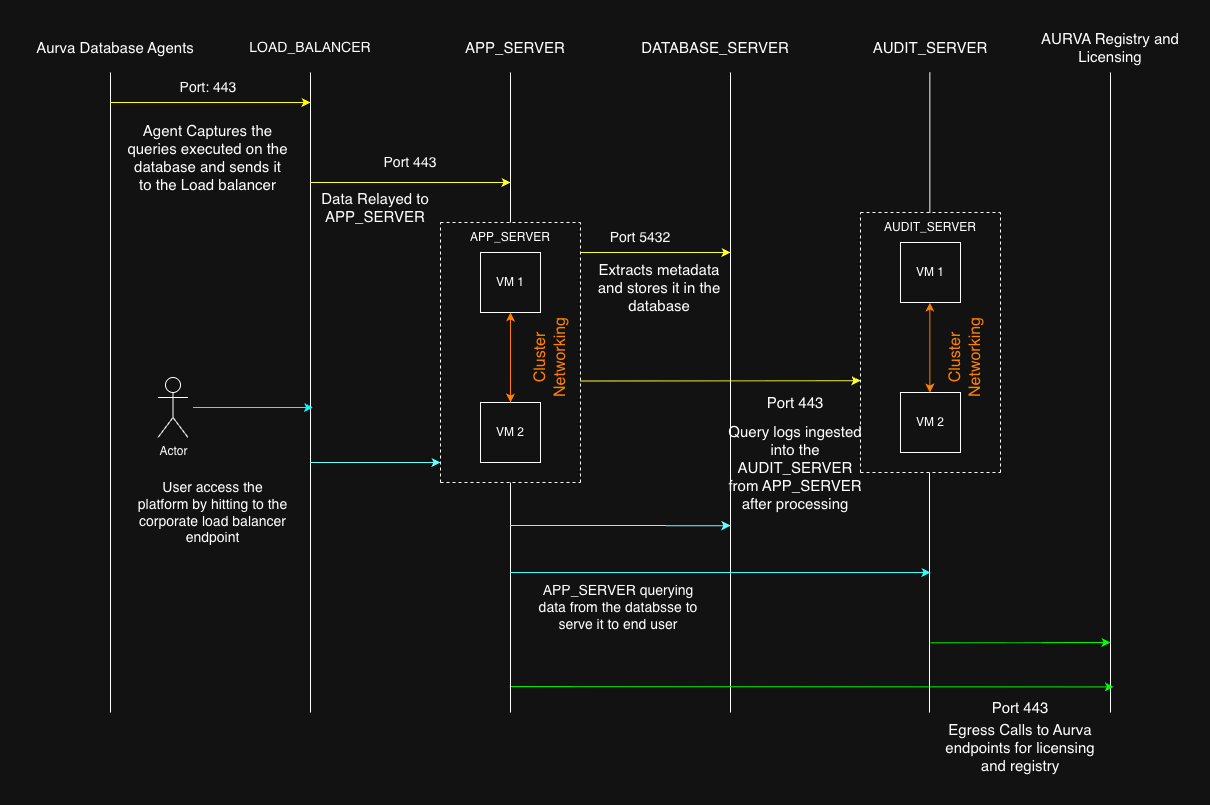
Infrastructure Components
| Component | Specifications | Purpose |
|---|---|---|
| Virtual Machines for Kubernetes Cluster ( APP_SERVER ) | APP_SERVER DC | The virtual machine will be the part of kubernetes cluster, which will be hosting all the Aurva applications running in it. The application configuration and internal networking can be found on this document. |
| Operating Systems : RHEL (8,9,10), Ubuntu (20, 22, 24, 25) Storage : 100 GB per node Architecture : x86_64 | ||
| APP_SERVER DR | ||
| Operating Systems : RHEL (8,9,10), Ubuntu (20, 22, 24, 25) Storage : 100 GB per node Architecture : x86_64 | ||
| Virtual Machines for Opensearch Cluster ( AUDIT_SERVER ) | AUDIT_SERVER DC | The virtual machines will be part of Aurva Opensearch cluster. Opensearch is used as a hot storage to store logs and queries triggered on the databases on which DAM is enabled. The estimation of exact storage is a factor of scale on the DAM database, as well as the duration we want to store the logs in hot storage. |
| Operating Systems : RHEL (8,9,10), Ubuntu (20, 22, 24, 25) Storage : Depends on the scale Architecture : x86_64 | ||
| AUDIT_SERVER DR | ||
| Operating Systems : RHEL (8,9,10), Ubuntu (20, 22, 24, 25) Storage : Depends on the scale Architecture : x86_64 | ||
| Virtual Machines for PostgreSQL cluster ( DB_SERVER ) | DB_SERVER DC | PostgreSQL stores the metadata information of the tool. |
| Operating Systems : RHEL (8,9,10), Ubuntu (20, 22, 24, 25) Storage : 256GB Architecture : x86_64 Size : Minimum v4CPU, 8GB Memory per node READ and WRITE replicas | ||
| DB_SERVER DR | ||
| Operating Systems : RHEL (8,9,10), Ubuntu (20, 22, 24, 25) Storage : 256GB Architecture : x86_64 Size : Minimum v4CPU, 8GB Memory per node Single Instance serving both READ and WRITE requests | ||
| File Storage ( ARCHIVAL ) | A file storage is mounted to all the Opensearch Virtual machines ( AUDIT_SRVR ) | File storage serves as the warm / cold storage for the Opensearch indexes. The exact size configuration of the file storage depends on the QPS of the target DAM Databases and also the retention period in years. Usually it ranges between 10TB - 100TB for a retention period of 1 year. This data can be loaded to Opensearch on the ondemand basis as and when required. |
| Load Balancer ( LOAD_BALANCER ) | Application Load Balancer (Company Managed) | The load balancer will be bringing the user traffic to the infrastructure serving the platform to internal users. This is a Company managed load balancer and Aurva won’t be configuring it. Aurva will provide the company with the target endpoints to hit in order to access the platform from the corporate network. |
Based on the network flow diagram, the overall internal and external networking with their respective ports are provided in the tables below:
Internal network
| Source | Destination | Port | Direction | Remarks |
|---|---|---|---|---|
| Aurva Agents (Target DAM database) | LOAD_BALANCER | 443 | Unidirectional | Agents will send data to the corporate load balancer |
| LOAD_BALANCER | APP_SERVERs | 443 | Unidirectional | Load Balancer Routing traffic to Application servers |
| APP_SERVER - X (APP_SERVER cluster networking) | APP_SERVER - Y (APP_SERVER nodes) | 6443, 2379, 2380, 2381, 10250, 10251, 10252, 9345 | Bidirectional | Rancher Ports. Application server should be able to connect each other on these ports |
| APP_SERVER - X (APP_SERVER cluster networking) | APP_SERVER - Y (APP_SERVER nodes) | 4240, 4244, 4245, 9962, 9963, 8472, 6081, 51871, 179 | Bidirectional | Cilium ports Application server should be able to connect each other on these ports |
| APP_SERVERs | AUDIT_SERVERs | 9200, 9600 | Unidirectional | Application Server to Opensearch |
| APP_SERVERs | DATABASE_SERVERs | 5432 | Unidirectional | Application server to PostgreSQL |
**
External network**
| Source | Destination | Port | Direction | Remarks |
|---|---|---|---|---|
| APP_SERVERs, DATABASE_SERVERs, AUDIT_SERVERs | registry.aurva.io | 443 | Unidirectional | Aurva’s artifact registry |
| APP_SERVERs | bifrost.aurva.io | 443 | Unidirectional | Aurva’s Licensing service |
| APP_SERVERs, DATABASE_SERVERs, AUDIT_SERVERs | resources.deployment.aurva.io | 443 | Unidirectional | Aurva’s Deployment Manager |
SSL Certificates
For the Application load balancer to make secure connections, we need to attach the SSL Certificates to them. The following certificates are required:
-
app.aurva.<domain>.<tld> eg: app.aurva.paytmmoney.com
-
api.aurva.<domain>.<tld>
-
controller.aurva.<domain>.<tld>
-
grafana.aurva.<domain>.<tld>
-
kibana.aurva.<domain>.<tld>
DNS Registrations
Following endpoints are required to be registered to the DNS server.
| DNS entry | Destination |
|---|---|
| app.aurva.<domain>.<tld> | LOAD_BALANCER_SERVER |
| api.aurvai.<domain>.<tld> | LOAD_BALANCER_SERVER |
| controller.aurva..<domain>.<tld> | LOAD_BALANCER_SERVER |
| grafana.aurva.<domain>.<tld> | LOAD_BALANCER_SERVER |
| kibana.aurva.<domain>.<tld> | LOAD_BALANCER_SERVER |